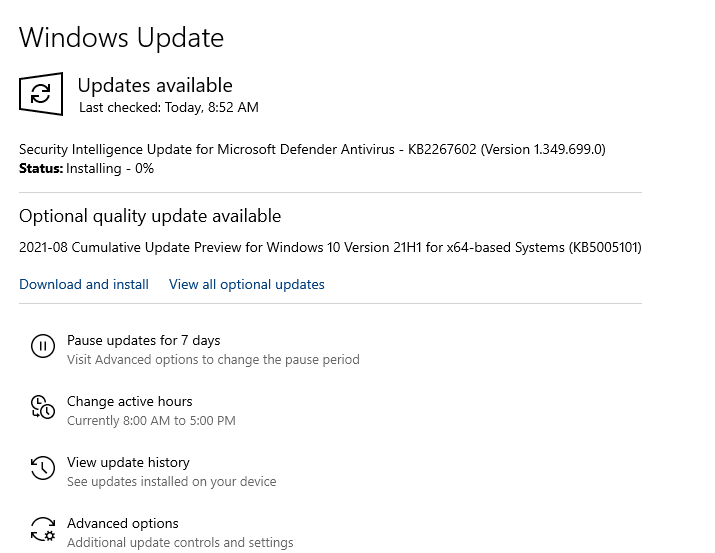
Windows updates starts at zero percent installing screen for long times. It may be due to the network buffering failure or pre-installed sources outdated versions. These Security patches from Microsoft product catalog helps you to re-instate the updates. In some situations, the issue occurs because Windows Update is not working properly on your computer.
See this screen the way it appears.

If your update process freezes during installation, you can also check this guide on how to fix Windows Update stuck issues.
Firstly, you need to check when was the last update successful. That means, there are some changes on your computer after the last successful attempt. We need to check the programs and features where you can find the recently installed apps. We need to check the date as per the last successful update and check to see whether any malicious programs got downloaded on your computer.
Windows 10 freezes updates when the network resources are stuck. Sometimes update failures may also show specific error codes such as Windows Update Error 0x80070002 when update files are missing or corrupted.This happens if you have any proxy network connection that hides the identity of the user machine. Windows 10 update cannot work if you have no internet connection as well. It is a must to see if any antivirus is stopping the windows services.
Windows update installation stuck at 0:
Some enterprise-level antivirus programs can even stop the system services as they will have restricted environment. Microsoft Office and Windows Home users can reach the support over the chat and enquire with the relative error codes. We can find out the issue causes that is halting your windows update at 0.
Solution Steps :
The alternate way is to find the name of the failed update and download it from the Microsoft Update Catalog and install it manually. However, this method works only for some machines. The windows computer should be bound to the network rules adopted by Microsoft Windows update servers.
Windows update stuck at 0 may sound odd when you have fully activated the windows 10 operating system. In some situations, damaged update files may trigger Windows Update Error Code 0x8007000d, which prevents the update from installing successfully. The issues mentioned above are very few. Sometimes, the windows corrupted files stop the windows services. In such cases, users may also encounter issues like Windows Update Error 0x800f081f, which prevents updates from installing properly.. You can repair system files by following this guide on how to run the DISM command in Windows 10 and 11. We need to scan and find out the glitches on your computer software.
In many cases, resetting the update services can resolve the issue. You can follow this guide to reset Windows Update components and clear corrupted update cache.
In some cases, office product installation also stocks at some percentage. We have to follow this article to fix this.
Our expert agents who talk about windows update stuck at 0. They say that there are some computers with incomplete system files. It means the users might have deleted the system files during a cleanup activity.
Some users have noticed the windows updates are stuck at 0 because of the old version of windows 10 files. This is necessary to update windows in a full method using some ISO files at some times.
Some users may also encounter installation failures like Windows Update Error Code 0x8007007f during system updates. If the issue continues even after trying these steps, you can follow our complete Windows Update troubleshooting guide for more solutions.
Windows Update Stuck at 0% – Frequently Asked Questions
Q. Why is Windows Update stuck at 0% during installation?
Windows Update may get stuck at 0% due to corrupted update files, network connectivity problems, antivirus interference, or issues with Windows Update services.
Q. How do I fix Windows Update stuck at 0%?
You can fix this issue by restarting Windows Update services, running the Windows Update troubleshooter, repairing system files using SFC and DISM tools, or resetting Windows Update components.
Q. Can internet issues cause Windows Update to freeze at 0%?
Yes. A slow or unstable internet connection can interrupt the download process and cause Windows Update to remain stuck at 0%.
Q. Can corrupted system files cause Windows Update to get stuck?
Yes. Damaged or missing system files can prevent Windows updates from installing correctly. Running SFC and DISM scans can help repair these files.
For more assistance, feel free to reach our windows chat support agents on chat.

Related Error Codes :
Getting installation error windows 10
Office 2019 something went wrong
Tags: configuring update for windows 10 stuck at 0, downloading updates stuck at 0 windows 7, windows 10 update stuck at 0 2020, windows 10 update stuck at 0 2021, windows 10 update stuck at 0 blue screen, windows update stuck at 0, windows update stuck at 0 do not turn off your computer., working on updates 0 this will take awhile